Every link opens in the right browser.
Turnout is a browser picker that sits in your menu bar as your default browser. Click a link in Slack, Mail or anywhere else, and it goes straight to the right browser or Chrome profile: work links to work, personal to personal.
Coming soon for macOS 14 Sonoma and later. Join the waiting list and we’ll email you when it’s ready.
Set it once, then stop thinking about it
Rules are short and readable: links on this domain, links containing this word, links clicked in this app. The first match wins, and anything without a match goes to the browser you choose.
Open links in a specific Chrome profile
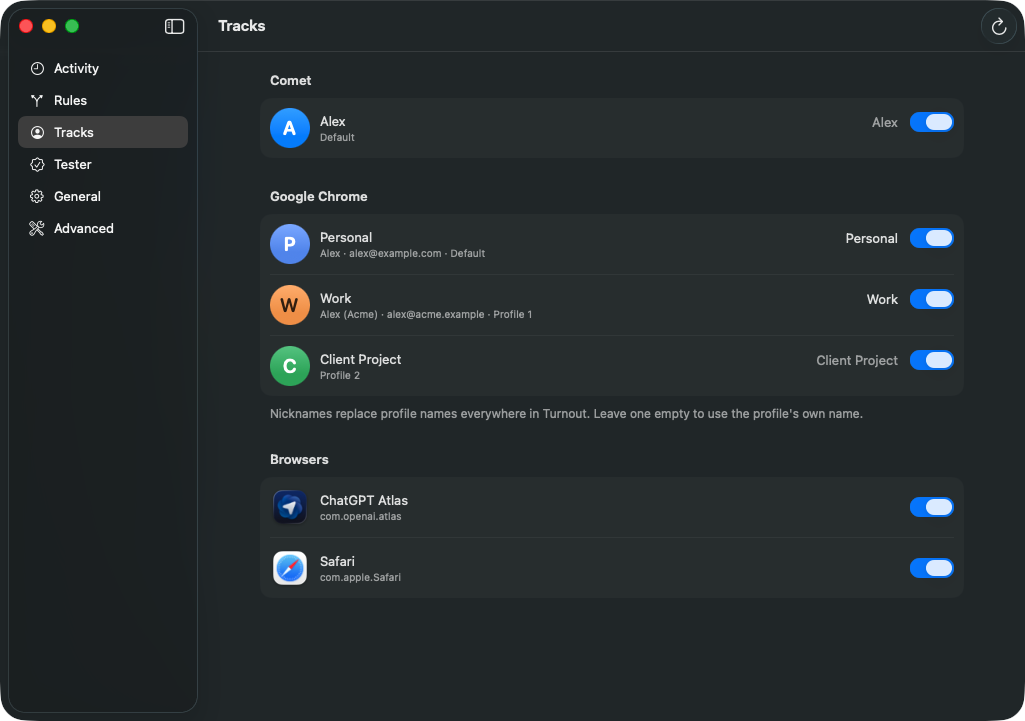
Turnout finds every profile in Chrome, Edge, Brave, Vivaldi, Comet and other Chromium browsers, with their real names and colours. Give each a nickname, hide the ones you never use, and send links to a profile or to a whole browser like Safari or Firefox.
“Last used profile” is a destination too, for links that should land wherever you were just working.
Reads the link behind the link
Slack, Google and Outlook wrap links in redirects. Turnout unwraps them first, so a rule for linear.app still matches when the link arrives as a SafeLinks URL.
Slack sign-in links carry the account you’re signing in as. With Pro, Turnout reads it, so signing in to your work Slack opens in your work profile.
https://nam12.safelinks.protection.outlook.com/?url=https%3A%2F%2Flinear.app%2Facme%2Fissue%2FENG-142&data=05%7C02…
https://linear.app/acme/issue/ENG-142
Or pick the browser each time
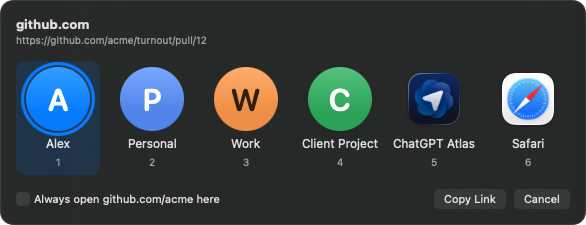
Send some links to “Ask each time” and a small picker opens at your pointer. Press a number, or Return, and the link is on its way. Tick “Always open here” and Turnout writes the rule for you.
- Wrong track? Open the last link somewhere else from the menu bar, and make that the rule in one click.
- Link tester. Paste any link and see exactly which rule catches it, and why.
- Recent links. Every link Turnout handled today, ready to reopen elsewhere.
- Stays on your Mac. Rules are a plain JSON file on your Mac, and links are routed on your Mac.
- Native. Built in Swift with standard Mac controls, in light and dark mode.
Free to use. Pro is yours for good.
Pay once, no subscription. Try every Pro feature free for 14 days.
Free
$0
- Every browser and profile as a destination
- Up to 3 rules by domain or keyword
- Unwraps Slack, Google and Outlook links
- Ask each time, link tester, recent links
Pro
$9.99 once
- Everything in Free
- Unlimited rules
- Rules by the app you clicked in
- Regular expression rules
- Slack sign-in account matching
If Pro ends, nothing breaks: links that needed a Pro rule open the picker with the right profile already selected.
Questions
Which browsers does Turnout work with?
Any browser can be a destination, including Safari, Firefox and Arc. Profiles are supported in Chromium browsers: Google Chrome, Microsoft Edge, Brave, Vivaldi, Comet, Chromium and their beta channels.
Can I use a different default browser for some websites?
Yes. Turnout becomes your default browser, then sends each website where your rules say: github.com to your work Chrome profile, YouTube to your personal one, everything else to Safari. Websites without a rule go to the browser you choose, or to a picker.
How is it different from Velja, Choosy or Finicky?
Turnout is built around browser profiles and the links work sends you. It unwraps Slack, Google and Outlook redirects before matching, can match the account in Slack sign-in links, and writes rules for you when you pick a profile from the picker or the menu. Unlike Finicky, you set it up in a settings window instead of a JavaScript file. See the full comparisons with Velja, Choosy and Finicky.
Does Turnout send my links anywhere?
No. Turnout decides where a link goes on your Mac, and your rules live in a plain JSON file that you can read, edit and back up.
What’s the difference between the download and the Mac App Store version?
They do the same thing. Because of the App Store sandbox, the App Store version needs a small helper script to open a specific Chrome profile; Turnout walks you through adding it. Pro bought in one version doesn’t unlock the other.
What happens when the Pro trial ends?
Your rules are kept. The first 3 keep working as usual, and links that need a Pro rule open the picker with their profile already selected, so nothing ends up in the wrong place.
How do I stop using Turnout?
Choose another default browser in System Settings › Desktop & Dock, then quit Turnout and move it to the Trash.
Be first on the right track
Turnout is almost ready. Leave your email and we’ll tell you the day it’s out.